KDP Trim Sizes: How to Choose the Right Book Size
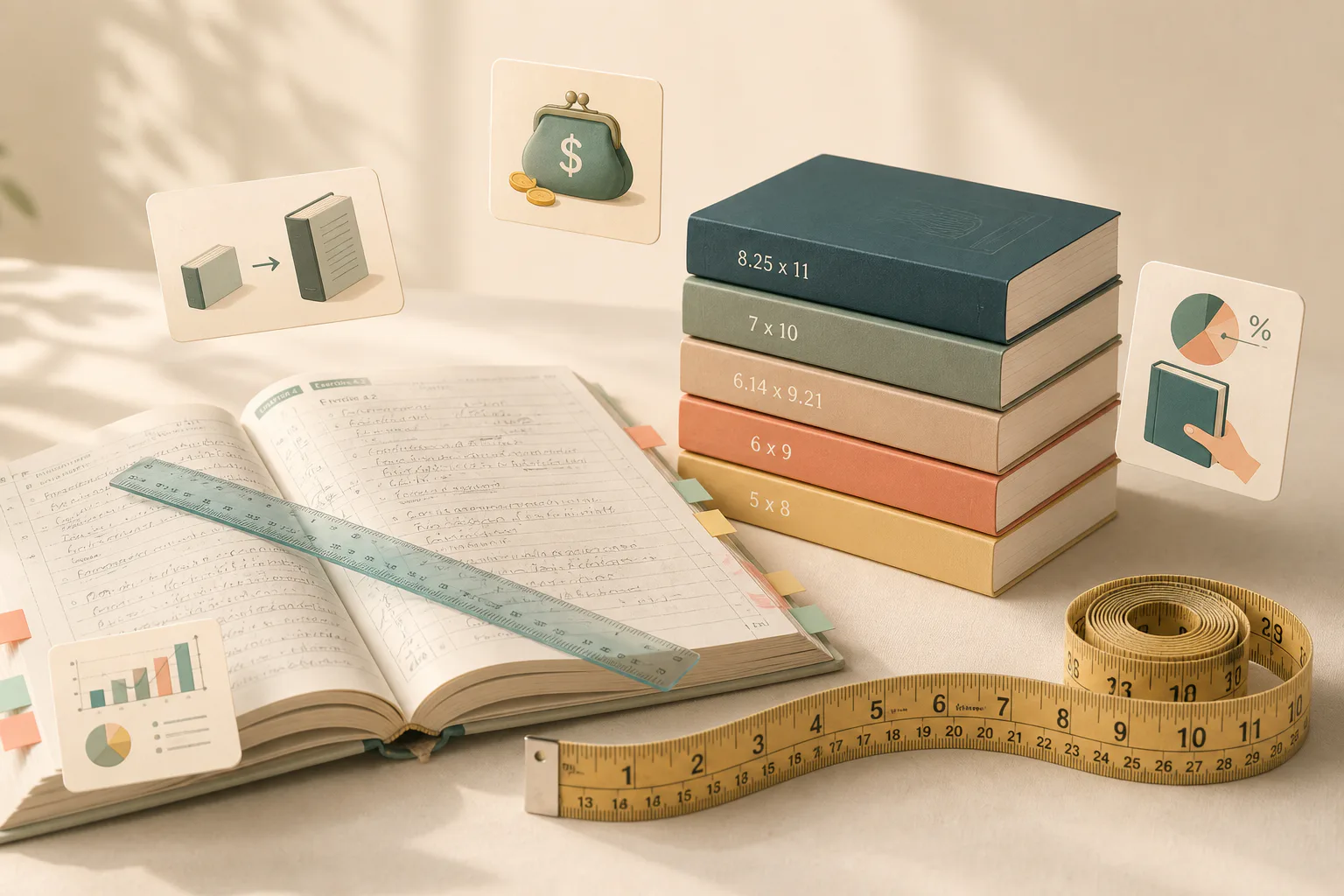
The most common KDP trim size is 6 x 9 inches (15.24 x 22.86 cm). It is Amazon's own default, and if you are publishing a novel or standard nonfiction and just want the safe answer, 6 x 9 is it.
But "most common" is not the same as "right for your book." Trim size decides how thick your book feels in hand, how many pages your manuscript needs, and what every printed copy costs you, which flows straight into your royalty per sale.
Here is every size KDP offers in inches and centimeters, which one fits which kind of book, and the bleed and margin numbers you will need when you format the interior.
Every standard KDP trim size (inches and cm)
Amazon's standard paperback menu (Print Options):
5 x 8 in (12.7 x 20.32 cm), the compact fiction size
6 x 9 in (15.24 x 22.86 cm), the default and most common
6.14 x 9.21 in (15.6 x 23.39 cm), large trim
7 x 10 in (17.78 x 25.4 cm), large trim
8.25 x 11 in (20.96 x 27.94 cm), large trim
Hardcover offers 5.5 x 8.5 in (13.97 x 21.59 cm) plus the same 6 x 9 and larger sizes.
You are not locked to the menu: KDP accepts custom paperback sizes from 4 to 8.5 inches wide and 6 to 11.69 inches tall. Popular in-between choices like 5.25 x 8 and 5.5 x 8.5 paperback live inside that custom range.
One threshold worth memorizing: anything wider than 6.12 in or taller than 9 in counts as large trim and prints at different rates.
Which trim size should you choose?
Match the size to the kind of book, not the other way around:
Novellas and shorter fiction: 5 x 8. A 40,000-word story looks and feels like a real book at 5 x 8; the same manuscript at 6 x 9 can come out pamphlet-thin.
Full-length novels: 5.5 x 8.5 or 6 x 9. The eternal debate (there is a whole Reddit thread on exactly this). Practical tiebreaker: 6 x 9 fits more words per page, so long books need fewer pages and cost less to print. Epic-length manuscripts almost always belong at 6 x 9.
Nonfiction and how-to: 6 x 9. The trade-book standard readers expect on the shelf.
Workbooks, journals, and activity books: 8.25 x 11. Room to write in, and the size buyers expect for anything worksheet-shaped.
Photo-heavy and premium nonfiction: 7 x 10. Big enough for images to breathe without workbook proportions.
Hardcovers: 5.5 x 8.5 or 6 x 9 for fiction and nonfiction; go larger only when the interior art demands it.
Trim size changes your printing cost
The mechanism authors miss: printing cost scales with page count, and page count depends on trim size. The same manuscript poured into a bigger trim needs fewer pages, so each copy costs less to print, and your royalty on every sale goes up.
Two catches. Crossing into large-trim territory (over 6.12 in wide or over 9 in tall) moves you onto different print rates, so the page savings do not always win. And each size has page-count floors and ceilings: a 6 x 9 black-ink paperback can run from 24 to 828 pages.
Want the actual numbers for your book? The free KDP Print Royalty Calculator shows your printing cost and royalty at any trim size and page count, and the Book Cost Calculator totals what a copy really costs you.
Bleed: the extra 0.125 inch
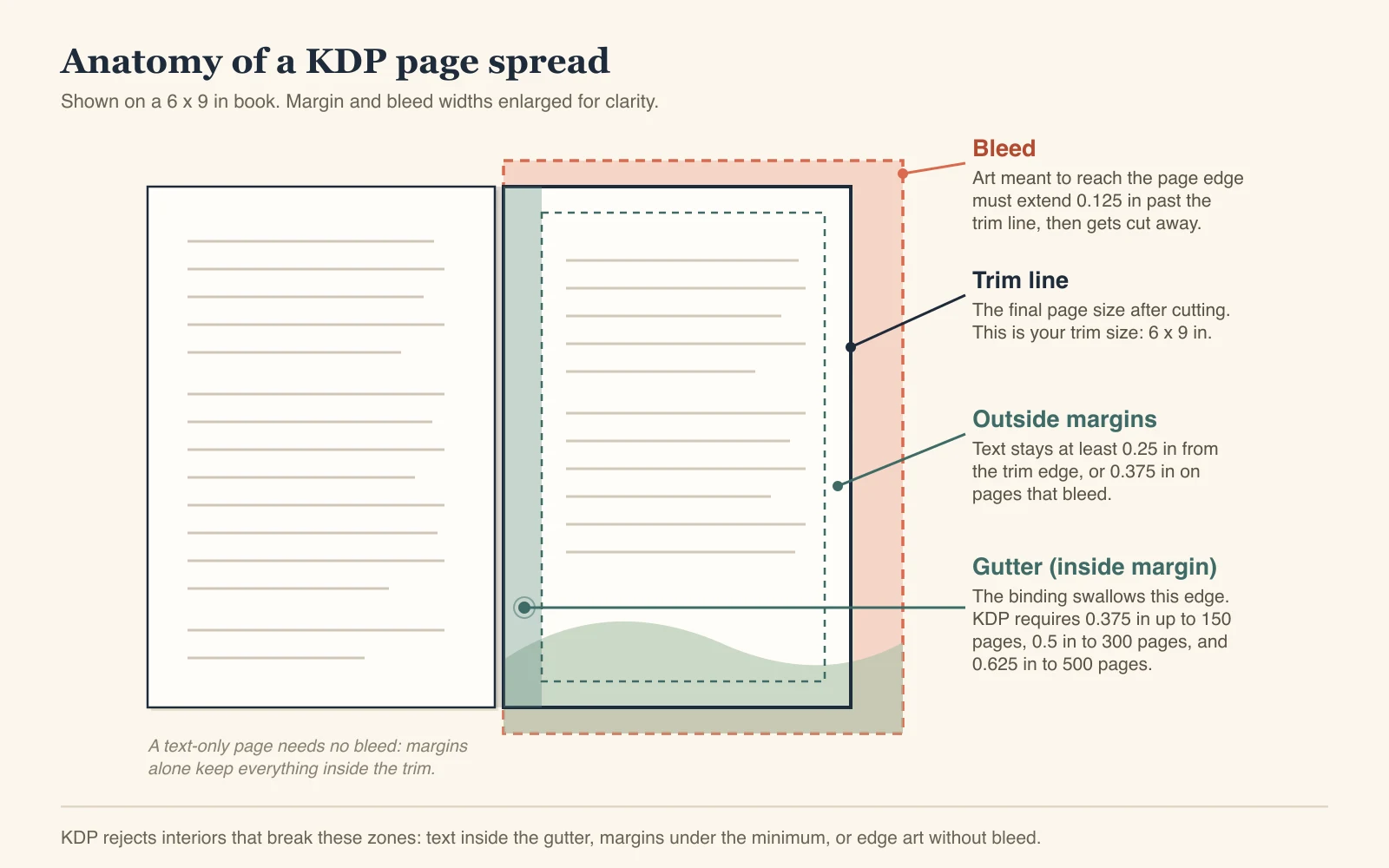
If any image, background, or illustration should run to the very edge of the page, your book needs bleed. Formatting with bleed means extending the page size by 0.125 in (3.2 mm) on every outside edge.
For a 6 x 9 book, that makes your manuscript page size 6.125 x 9.25 in (15.56 x 23.5 cm). Text-only interiors, which covers most novels and nonfiction, do not need bleed at all. Amazon's trim, bleed, and margin guide has the full spec.
Margins depend on page count
The inside (gutter) margin grows with your page count, because thicker books swallow more of the page in the binding:
24 to 150 pages: 0.375 in inside margin
151 to 300 pages: 0.5 in inside margin
301 to 500 pages: 0.625 in inside margin
Outside margins need at least 0.25 in without bleed, or 0.375 in with bleed. Set these before you format; fixing margins after layout is the painful way around.
Or skip the manual setup entirely: Amazon's Format Your Paperback guide links free pre-sized manuscript templates for every trim size, with the margins and bleed already set, so you can pour your text in instead of typing the numbers yourself.
Custom trim sizes: allowed, with trade-offs
Anything inside 4 to 8.5 in wide by 6 to 11.69 in tall is fair game. Custom sizes make sense when the format is the product, like a slim gift book or a wide-format planner.
Before committing to a nonstandard size, check its options on Amazon's Print Options page: ink, paper, and distribution eligibility vary by size, and Expanded Distribution has its own rules. Standard sizes keep every option open; custom sizes can quietly close doors.
Trim size is one of the decisions worth locking early, well before the launch-day scramble, because the cover, spine, and interior layout all depend on it.
Why KDP rejects interior files
Most interior rejections trace back to one of the zones in the diagram above. If your file bounces, check these in order:
Text or page numbers inside the gutter. Your inside margin is smaller than KDP requires for your page count. Fix: set the gutter to the bracket above (0.375, 0.5, or 0.625 in) and reflow.
Margins under the minimum. Anything closer than 0.25 in to the trim edge (0.375 in on bleed pages) gets flagged, including headers, footers, and page numbers.
Edge art without bleed. An image touching the page edge in a file formatted without bleed means KDP either rejects it or prints a white sliver at the edge. Fix: reformat at the bleed page size (trim width + 0.125 in, height + 0.25 in) and stretch the art past the trim line.
Manuscript page size does not match the trim size. If you picked 6 x 9 in KDP but your PDF pages are 8.5 x 11, the printer cannot reconcile them. Fix: set the document page size to your exact trim (or trim plus bleed) before exporting.
None of these are judgment calls by a reviewer; they are mechanical checks. Get the four numbers right and the interior sails through.
FAQ
What is the most common KDP book size?
6 x 9 inches (15.24 x 22.86 cm). It is KDP's default trim size and the standard for both fiction and trade nonfiction in the US store.
What trim sizes does KDP offer?
Standard paperback sizes run from 5 x 8 up to 8.25 x 11 inches, hardcover from 5.5 x 8.5 up to 8.25 x 11, and custom paperback sizes are accepted anywhere from 4 to 8.5 inches wide and 6 to 11.69 inches tall.
What is trim size in book publishing?
The final width and height of the printed page after the printer cuts (trims) the book to size. Everything else in your interior file, margins, bleed, and cover dimensions, is measured against it.
What are KDP book sizes in centimeters?
The common ones: 5 x 8 in is 12.7 x 20.32 cm, 5.5 x 8.5 in is 13.97 x 21.59 cm, 6 x 9 in is 15.24 x 22.86 cm, 7 x 10 in is 17.78 x 25.4 cm, and 8.25 x 11 in is 20.96 x 27.94 cm.
What size should my KDP cover be?
Cover dimensions are not fixed: they derive from your trim size plus your exact page count, which sets the spine width. Use Amazon's cover calculator and template generator after your interior page count is final.
Do I need bleed?
Only if images or backgrounds run to the edge of the page. If your interior is text with normal margins, format without bleed. With bleed, add 0.125 in to every outside edge of your page size.
Can I change trim size after publishing?
Yes, but it is a real project: the interior must be reformatted for the new dimensions, the cover must be rebuilt around a new spine width, and the book goes through KDP review again. Pick carefully the first time.
More from the blog
Mass-Producing AI Books on KDP? Here's the Risk You're Not Pricing In
Mass-producing AI books on KDP feels like easy money right now — until one flagged title puts your entire account at risk. Here's what's actually driving Amazon's crackdown, and the moves that protect your income before the platform makes the decision for you.
10 min readReadKDP Risks: Why Amazon’s Platform Is High Risk for Authors
One suspicious review. One automated flag. One email and your KDP account, plus every royalty you're owed, is gone. Here's what actually gets authors suspended, why "I haven't broken any rules" won't save you, and how to build a book business that doesn't live or die by Amazon's discretion.
7 min readReadTurn Your Author Page Into a Sales Machine on KDP (Step-by-Step)
Your Amazon Author Central page is free real estate you fully control — this guide walks through setup, claiming every edition of your books, and building a profile that keeps working for you after launch.
10 min readRead